Your Start at PPL

As the transition over to us is now complete, we would like to share some additional information to help support a smooth and welcoming experience. This page contains important guidance and information that you may need over the coming weeks.
We understand that periods of change can bring questions, and we want to ensure that you feel informed and supported throughout the process. If you have any queries or require any further information, please do not hesitate to contact us.
If you wish to revisit the information shared previously, please click the link below.
"We live by our five values everyday, working in true partnership with health and social care organisations to deliver simple solutions that empower people, strengthen places and improve lives."
You should recently have received a TUPE information letter from us via email containing important details regarding the transfer process.
If you have not yet received this, or if you believe it may have been sent to an incorrect address, please contact us at HR@peopleplaceslives.co.uk
BrightHR
Access to BrightHR, our HR platform, will be available from Monday 1st June. On this date, you will receive a registration email along with next steps and guidance on how to set up your account. Once your access has been granted, please log in and review your personal details on your profile page to ensure all information is accurate and up to date.
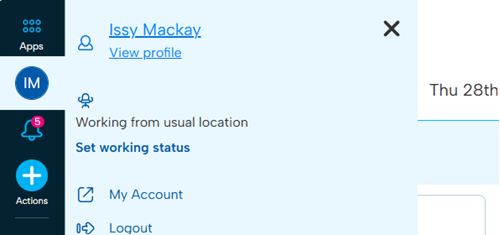
To navigate to your profile, click on the circle with your initials in sidebar and then click your name/view profile.
Here you will be able to view your absence information, employment details, and personal details. You will also be able to add your emergency contact details via this page too.
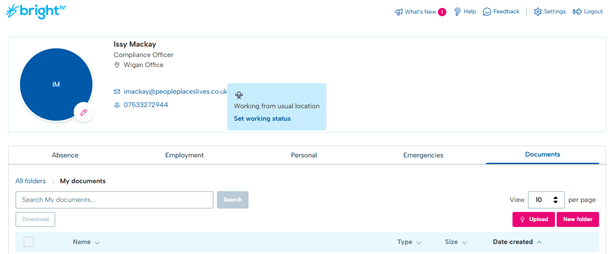
If you notice any incorrect information or experience any issues, please contact HR@peopleplaceslives.co.uk so we can resolve the matter and make any necessary updates.

Here is some initial guidance on how to use the platform, including what to expect and which features we currently use as a company, as some areas of the platform are not relevant at this time: BrightHR Staff Training
Once you have logged in, you will see that you have been assigned additional mandatory training on how to use the platform. Please ensure this is completed.
BrightHR is used to manage annual leave and sickness requests. The calendar allows you to view other team members leave helping to support visibility and planning.
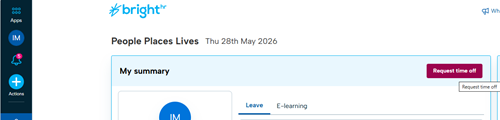
Any pre-approved annual leave or sick leave will be added to BrightHR by managers over the coming days. To book new annual leave, you can click the 'Request time off' button on the main dashboard.
Roadshows
During the roadshows, there will be a presentation delivered by our team, providing an introduction to the organisation and outlining the plans and arrangements moving forward. These sessions will also offer an opportunity for everyone to meet colleagues from the combined organisation and support a smooth transition process. Identification badges will be issued and shared with all attendees.
Our IT teams will coordinate the handover and transition of laptops and any other relevant technical equipment and assets, ensuring that all necessary systems and access arrangements are in place.
Please only attend the roadshow event that you have agreed to attend and do not switch events, as we will only have equipment prepared for those included on the confirmed attendee list. Please also ensure that you arrive on time and are prepared to stay for the full day.
Roadshow 1
Date: Tuesday 16th June 2026
Time: 9am onwards
Location: Wigan Office
Roadshow 2
Date: Thursday 18th June 2026
Time: 9am onwards
Location: Sheffield Office
Roadshow 3
Date: Wednesday 24th June 2026
Time: 9am onwards
Location: Ashford PPG Office
Photo ID Cards
A photograph is required in order to produce your employee photo identification card. The image provided should be a clear, passport-style photograph (with a smile if you wish). Further guidance regarding the photo requirements can be found here: Photo Guidance
Please ensure that the image submitted meets the required standards. If the image is unsuitable or does not meet the stated requirements, you may be asked to provide an alternative image.
IT Support
Until you have been migrated to PPL (including laptops, systems, and related IT services), all IT related queries, requests, and issues should continue to be raised with PPG through the usual support channel: PPG Service Desk. The migration process will take place during the roadshows. For anyone unable to attend a roadshow, a separate migration date will be arranged.

Following the migration, responsibility for IT support will transfer to PPL. From this point onwards, all IT queries and issues should be directed to PPL. This will include those relating to equipment, system access, software, and general technical support.
Requests and incidents should be submitted via PPL’s internal service desk system, Jira, using the following link: PPL Internal Technical Operations Service Desk. Once submitted, queries will be reviewed and triaged by the relevant support teams accordingly.
Expenses

To submit expense claims prior to 1st July, requests should be completed using the following form: Expenses Claim – Fill in form
From 1st July onwards, all expense claims will be process through QuickBooks. Access to the system, along with guidance and training and on how to use it, will be provided.