
September 2026 Portal Updates
In September, PPL will be updating our websites and Virtual Wallet, to improve the system and make it easier to use.
In summary, the changes are:
- Merging the PPL website and MyVirtualWallet website
- Updating the home page when you log in
- Updating the navigation menu when you login
- Changing some of the colours and design of the site
To find out more, read the relevant sections below:
1. Merging the PPL website and MyVirtualWallet website
We currently have two websites (www.peopleplaceslives.co.uk, and www.MyVirtualWallet.co.uk). When the update goes live, the two websites will merge, with all web pages being published on the peopleplaceslives.co.uk website.
From that point, access to the PPL Portal and VirtualWallet will be from the People Places Lives website. Don't worry if you forget - if you go to the old MyVirtualWallet website, you will be automatically redirected to the right site.

2. Updating the home page
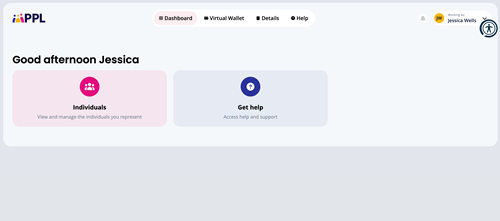
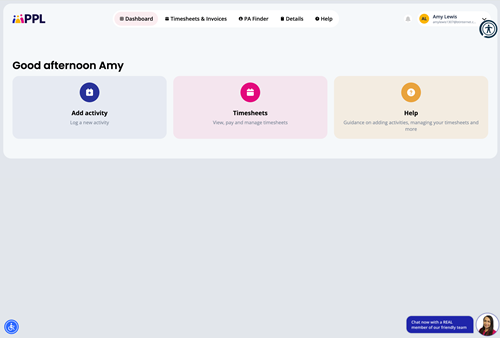
When you log in currently, the first page you normally see is the home page or "dashboard". Depending on the type of role you have (individual, authorised representative, PA or provider), you will see a different dashboard, with different navigation options.
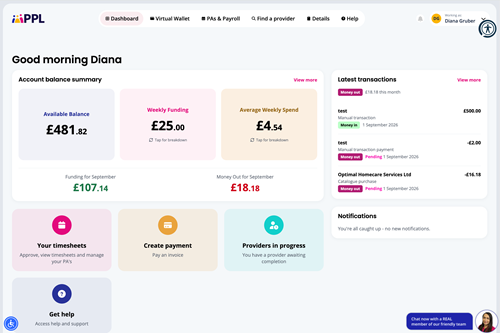
When this update goes live, your Dashboard may look different, as we have updated the style of the page, but for most people the page will work in exactly the same way as it did before. The main difference will be for Individuals (or when a Representative "Works As" an individual). The update will give you a new Dashboard, which will show:
- Your Account Balances
- Your last few transactions (Money In and Money Out)
- Your latest notifications
- Links to popular pages, such as Timesheets
Here are some examples of the new screens:
Logging in as an individual
Logging in as an Authorised Representative
Logging in as a PA
3. Updating the navigation menu
The current menu has been updated in the new design. As well as looking different, we have changed some of the titles and names in the menu to make pages easier to find.

The different menu headings focus on different aspects of your direct payment:
- Dashboard - this takes you back to the home page dashboard that we described above.
- Virtual Wallet - this includes information relating to your funding and payments, including your transactions and current balance.
- PAs & Payroll - this section includes pages relating to management of your PAs, including timesheets.
- Find a provider - this part of the portal focusses on finding a new provider and includes links to the PA finder and the Provider Marketplace.
- Details - this includes information about you, such as your details, your calendar and password changing.
4. Changing the colours and design
Feedback from users indicated that it was time for a refresh of the interfaces. What you can do on the pages remains the same, but you should notice some slight changes to the colours and styles of the pages themselves. We hope you like it!
We welcome your feedback
We hope you enjoy the new features and design of the new, improved website and portal. If you have any comments or feedback on the changes, please feel free to contact us.